
For discretionary traders

Get your trading plan in minutes.

Cortiq turns your market research and trading rules into a plan for today’s session. See which levels to watch and what would make you take or pass on a trade.

Trade the plan yourself, or let AI watch the market and execute within the limits you set.

Lifetime license · 14-day refund for any reason

Windows 10 / 11 · MetaTrader 5 · Bring your own AI
AI usage and broker fees are separate.

Works with what you already use
MetaTrader 5 (multi-instance)OpenRouterLocal LLM (Ollama / LM Studio)Supported agent connectionsDirect API (OpenAI / Anthropic / Gemini)

Sound familiar?

Still copying charts and explaining the same rules?

You can ask AI about a chart. Getting it to work with your rules, check an idea against history and use what you already researched takes more. Cortiq gives that work a home, focused on the market you want to understand.

The setup looks convincing. Has it actually been tested?

AI explains why a trade might work. You still need to see what happened in other cases, including the ones that failed.

Work with Copilot to define the rules, run historical backtests and inspect failed cases, costs and limitations. A convincing explanation is a starting point for research.

Follow an idea into a historical test
Price has moved since the screenshot.

You send a chart, explain the level and discuss the setup. Then price moves and you have to supply another update before the conversation can continue.

Give AI access to market context through Cortiq's tools. For delegated monitoring, choose an Autonomous session and set its permissions. Your computer, MT5 and connections need to stay available.

Choose how you work with AI

You researched this market last week. Where are the findings?

The chart notes are in one chat, the test results in another. Before you can move forward, you are explaining the same market and rules again.

Keep research and saved knowledge with the instrument. Select relevant context for later sessions and request reviews to examine decisions. You decide what deserves further testing.

See what stays with your market

The session starts. Your plan is somewhere else.

You have preparation and entry rules, but checking them means switching between your notes, charts and AI conversation while the market is moving.

Bring selected preparation, playbooks and Copilot into your Manual session. Ask questions against that context while you place and manage your orders.

Bring your preparation into trading

See the AI trading workspace

From a question to an action you can inspect.

Take a closer look at Copilot on the chart. Play with sound for the narrated walkthrough, or follow the captions.

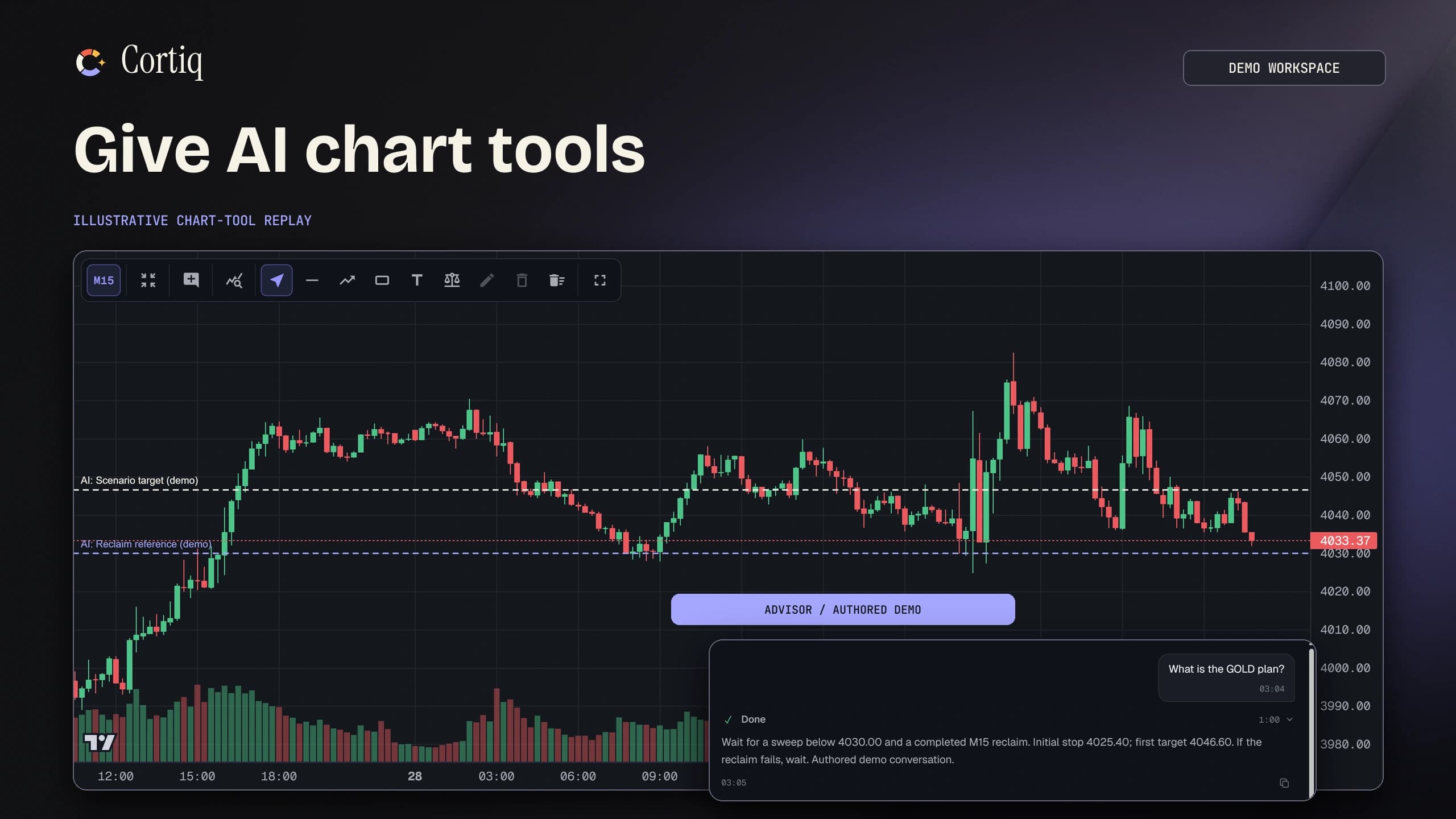
Give AI chart tools

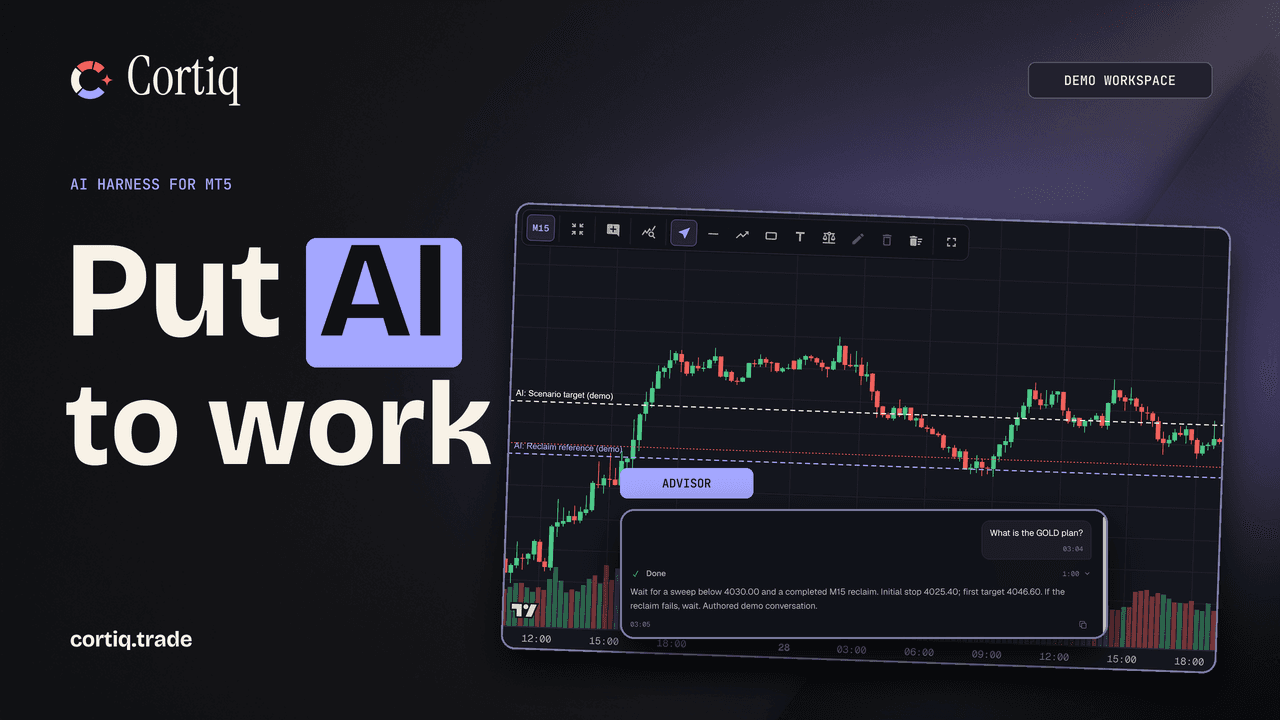
Ask about market structure, illustrate levels on the chart and inspect an advisor response grounded in session context.

The workflow

Follow one GOLD idea into a session.

You bring the question. Cortiq gives you and your AI the context and tools to work through it.

Example research question

When GOLD sweeps below support and closes back above it, is there enough structure to consider a long?

  1. Investigate the question.

    Examine historical cases with Copilot. Keep the measurements, evidence and limitations.

  2. Write the playbook.

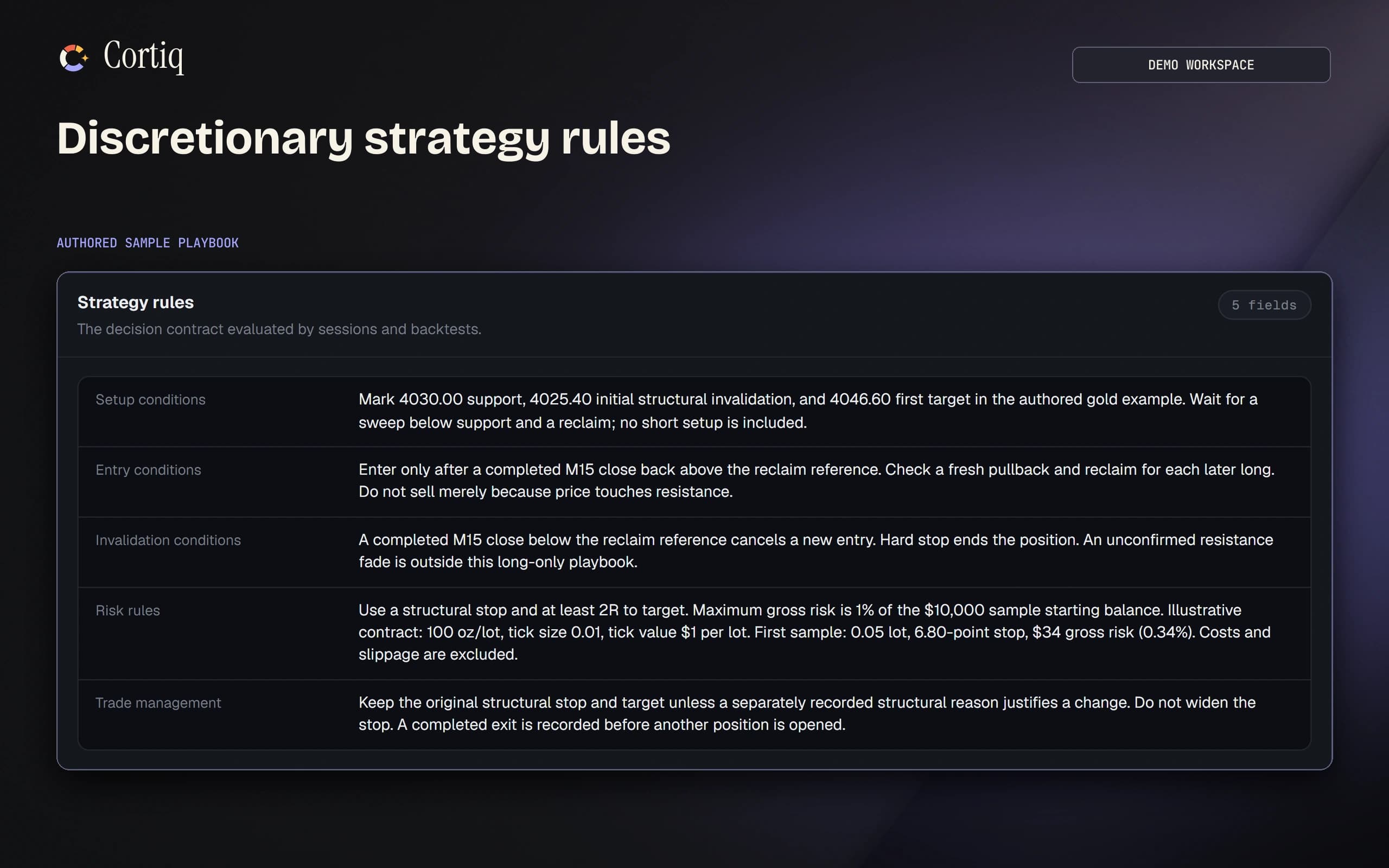
    Define the timeframe, entry conditions, invalidation and risk. Make the idea specific enough to examine.

  3. Test the decisions.

    Run historical replay. Inspect failed cases and costs alongside the results, with the run settings in view.

  4. Prepare and trade.

    Bring the playbook into session preparation. Use Copilot in a Manual session or authorize an Autonomous session, then request a review.

Cortiq discretionary playbook with entry, invalidation and risk rules.
A GOLD playbook in Cortiq. Select to inspect its rules.

The whole process, connected

From hunch to backtest to trade, in one place.

Your Instrument Hub keeps knowledge, research, playbooks, sessions and backtests for one market together. Bring selected context into the next task, request reviews and challenge what the evidence supports. Pick a part of the process to explore.

Start with a question. Keep the evidence.

Investigate a market question using saved studies and MT5 data. Inspect the measurements, findings, and limitations before deciding what to test.

You
Choose the question and challenge the conclusion.
AI
Investigate the data and develop findings you can inspect.
Explore the full workflow

Inside the workspace

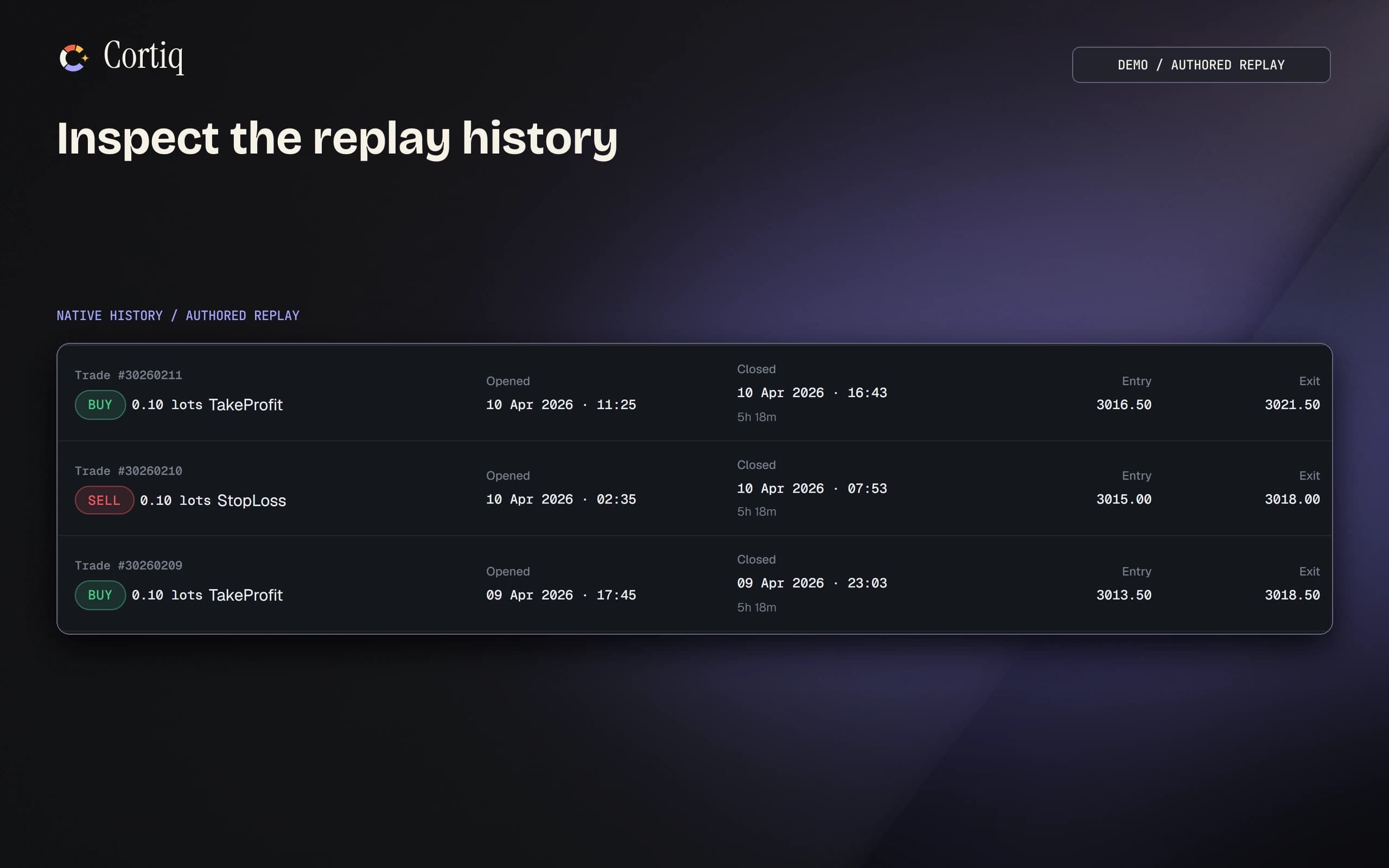
Inspect the trades behind a test.

Open individual replay trades and compare entry, exit and timing. Inspect the run settings and available cost evidence before drawing a conclusion.

Cortiq historical replay trades with entry, exit and timestamps.
Historical replay · Select to enlarge

You choose the division of work

You decide how much the AI may do.

Work with AI throughout research, historical testing and trading. Choose the execution mode and authority for each session; Cortiq enforces the configured boundaries outside the model.

Think it through with Copilot.

Question a market read, develop research, refine a preparation, or inspect a backtest. Copilot works with your Cortiq context, so you can keep the discussion close to the evidence.

Delegate an Autonomous session.

Choose an instrument, account, and playbook. Give the agent authority to monitor and execute through MT5 within the session scope and configured risk limits.

The controls sit outside the model. Cortiq checks trading actions against your authority and risk settings. Those checks do not remove market risk or guarantee a limit on losses.

See how it works
One instrument per session

A path to knowing one market.

Cortiq is built around a focused practice: return to the same market, study its behaviour, test your ideas and review what happened. Keep the context together instead of rebuilding it at the start of every session. Saved knowledge gives you and your AI a shared record to revisit. Request reviews and test new observations before treating them as rules. This supports your study; it does not guarantee mastery or returns.

The principle

Keep a consistent frame of reference

A familiar instrument gives you a consistent place to examine session behaviour, recurring conditions and your own decisions. Research and backtests can challenge that familiarity with evidence. For wider reading on different traders' approaches, explore Jack Schwager's Market Wizards interviews.

A living example

Watch a trader explain the work

Tom Hougaard shares trading recordings and his perspective on preparation, execution and psychology through Trader Tom. Use independent material like this to question your own process. It is a perspective on trading, not a Cortiq recommendation.

Execution modes

One instrument. Two ways to trade it.

Trade manually from the live chart or run the full loop in a separate Autonomous session. Both stay on one market, under explicit risk limits, with each action recorded.

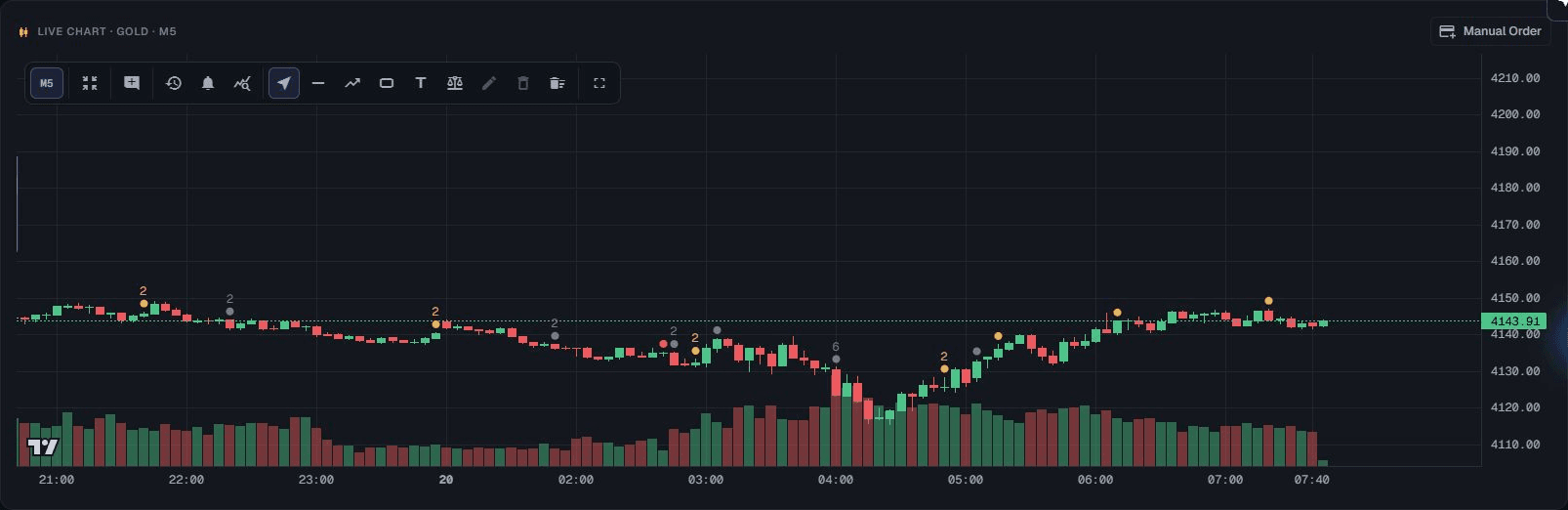
cortiq · GOLD · session chart
Current Cortiq GOLD session chart with candles, volume, and recorded event markers

Captured from the current Cortiq desktop app. The chart shows the interface, not a performance claim.

Manual

Keep every order in your hands

Place and manage every order from the live chart. Cortiq still prepares the market, keeps the research, and records what happened.

  • A live chart in the session, with timeframes, drawing tools, indicators and scroll-back through history.
  • A guided ticket: set the stop first, pick 0.5%, 1% or 2% risk, and the lot size is calculated for you.
  • ATR presets for stops and targets, or click the price straight off the chart.
  • Close, part-close and move stops on any open position without leaving the chart.
Autonomous

Run the full session loop

In a separate Autonomous session, the agent runs the broader loop: wake, read, decide, act. You set its session authority, inspect every cycle, and can stop it.

  • The agent wakes on your triggers, reads the data package you approved, and decides.
  • Every wake is logged as a cycle you can open: what it saw, what it decided and what it did.
  • Its decisions are drawn on the same chart, so you can see where it acted.
  • The broader session authority and hard risk limits are explicit, inspectable and enforced outside the model.
Shared
The same guardrailsDaily and weekly drawdown, profit targets, trade caps and loss-streak stops are checked outside the model. Your settings determine which accounts and externally placed trades are included in risk management.
Shared
The same journalYour trades and the agent’s land in one journal and one session review, so the record of the instrument is continuous whoever placed the order.
Shared
The same one instrumentA session is locked to a single market. There’s no scanner and no basket. The point is depth on one instrument, not coverage of forty.
Inside Cortiq

One workspace for the work around every trade

Follow the work from a research question to session review. The complete catalogue is here, with the inputs, records and controls behind each part of the process.

Decision record

Inspect the record behind a decision

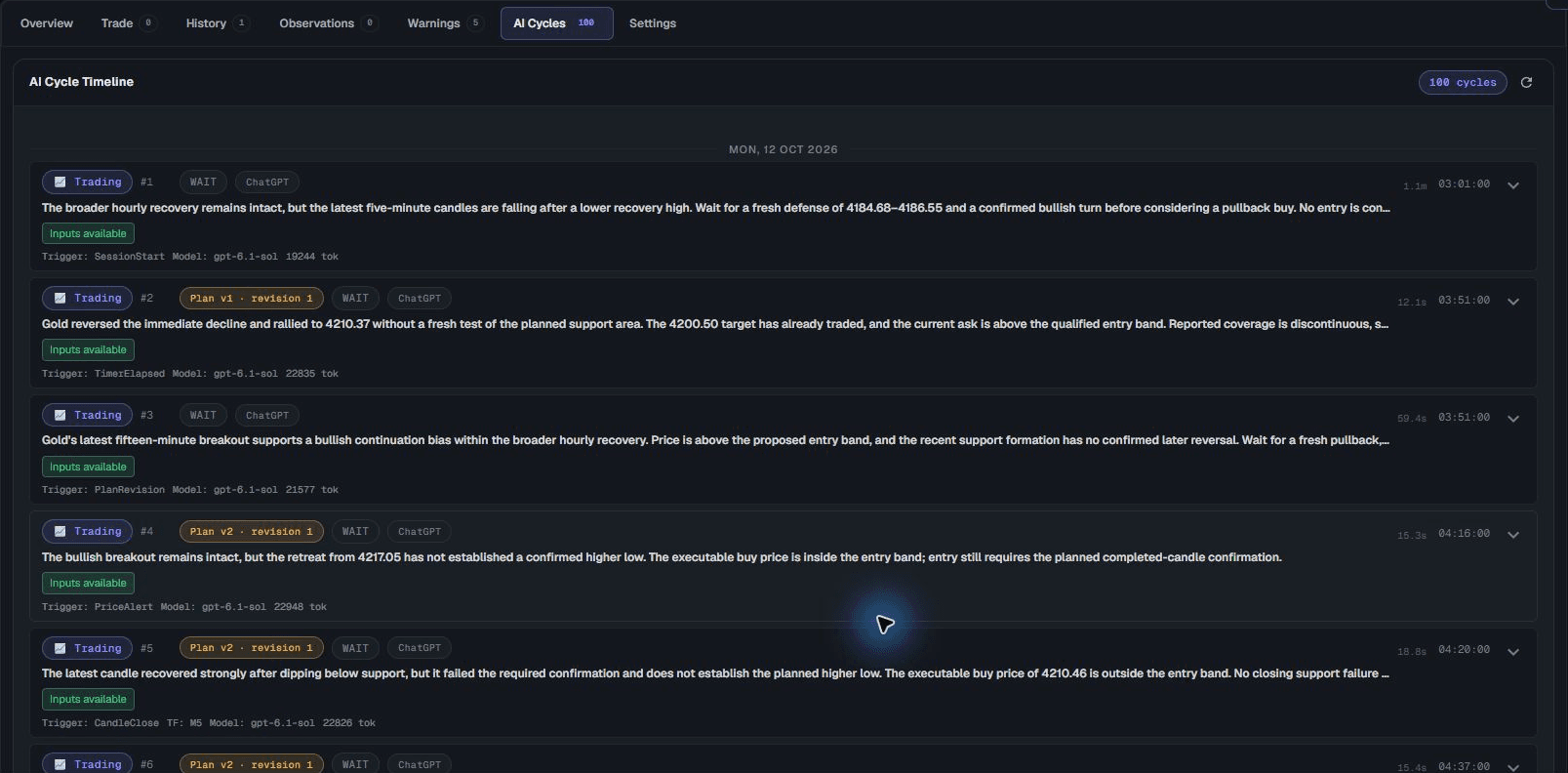
Inspect the available evidence, concise rationale, requested action and recorded outcome. Follow the sequence of decisions, including the moments the agent chose to wait. This capture shows a historical backtest, not a live trading record.

cycle triggerevidence + rationalerecorded decisioninput status
cortiq · recorded backtest decisions
Current Cortiq AI-cycle timeline from a historical backtest, with decisions, triggers, and input status
cortiq · instrument hub
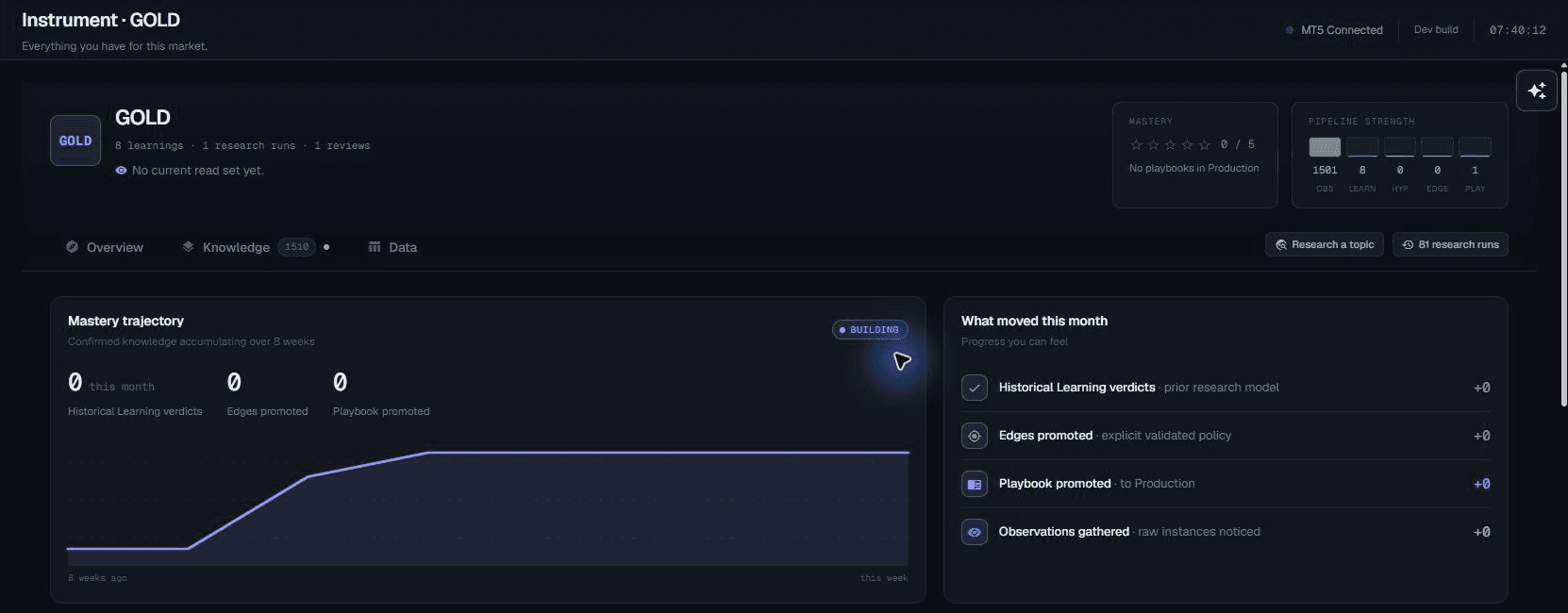
Current Cortiq Instrument Hub for GOLD, with the knowledge pipeline and market-specific history
Instrument Hub

Everything you’ve learned about a market, in one place

Keep the playbooks, sessions, backtests and research for one symbol together. Inspect the observations, findings, hypotheses and evidence behind your process. You decide which conclusions to develop and which playbooks to promote; saving a finding does not automatically validate it.

★ mastery ratingfive-stage knowledge pipelineinspectable findingsrecorded provenance

Turn a question into evidence.

Research the market, examine what you find, and practice the process before sending live orders.

Research

Study one market deeply

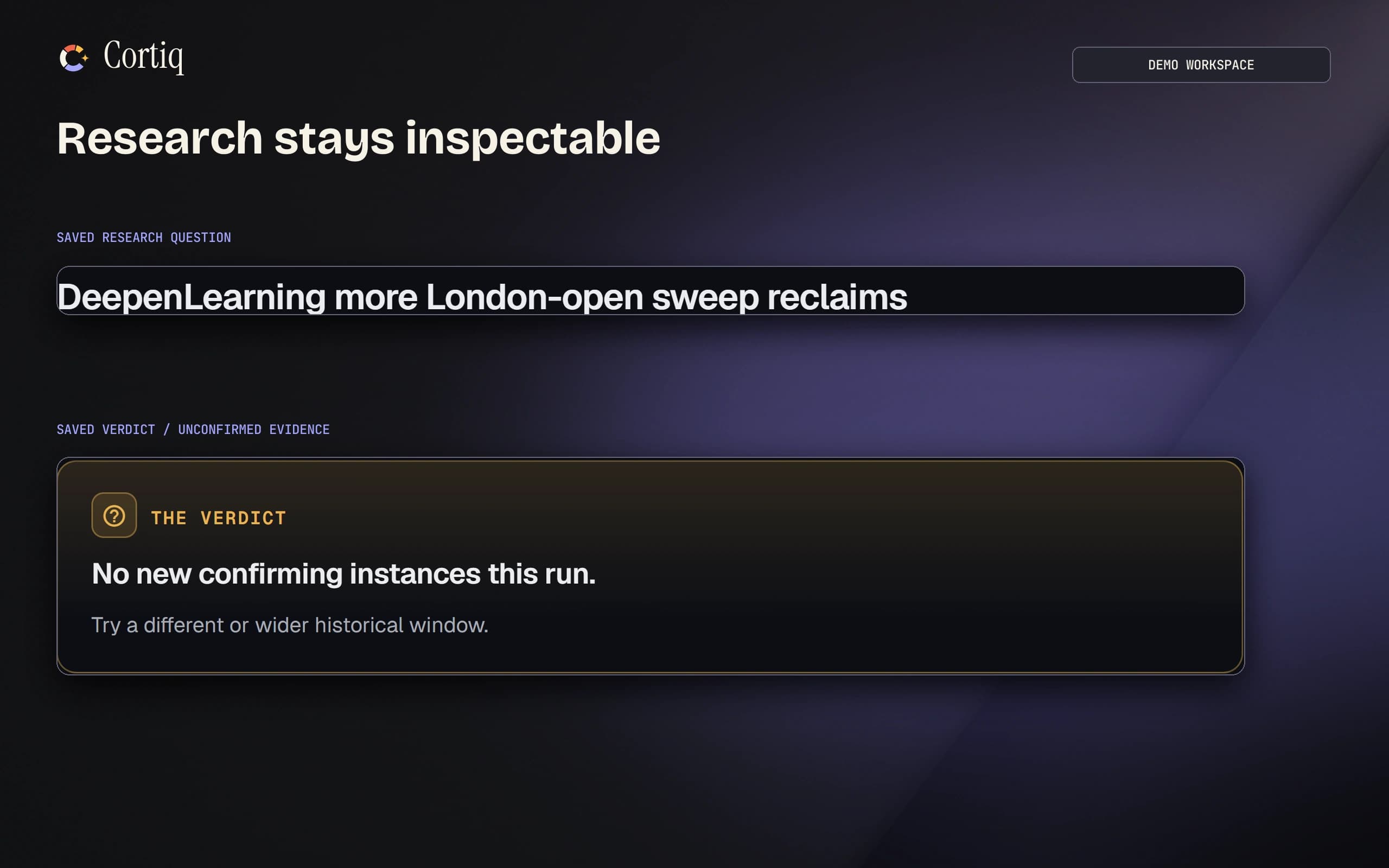
Investigate a specific market question with saved data and a structured research workspace. Keep the measurements, findings and limitations available for scrutiny.

cortiq · research history
Cortiq research workspace with an unconfirmed finding and visible evidence limitations.
Exploration

Investigate history before changing the rules

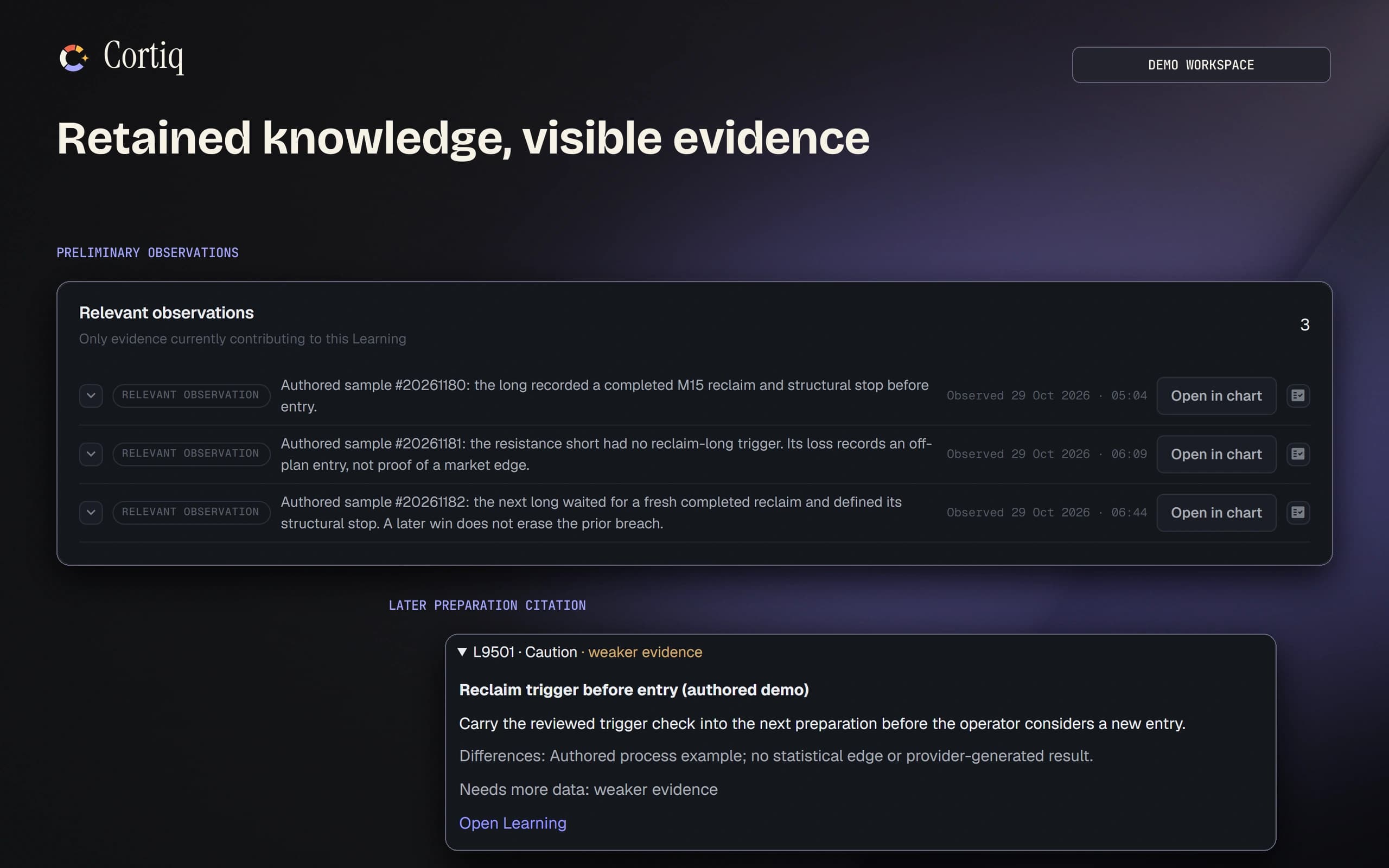
Use historical data to develop observations and research questions. Examine the evidence and its limitations before carrying a finding into a playbook.

cortiq · knowledge ledger
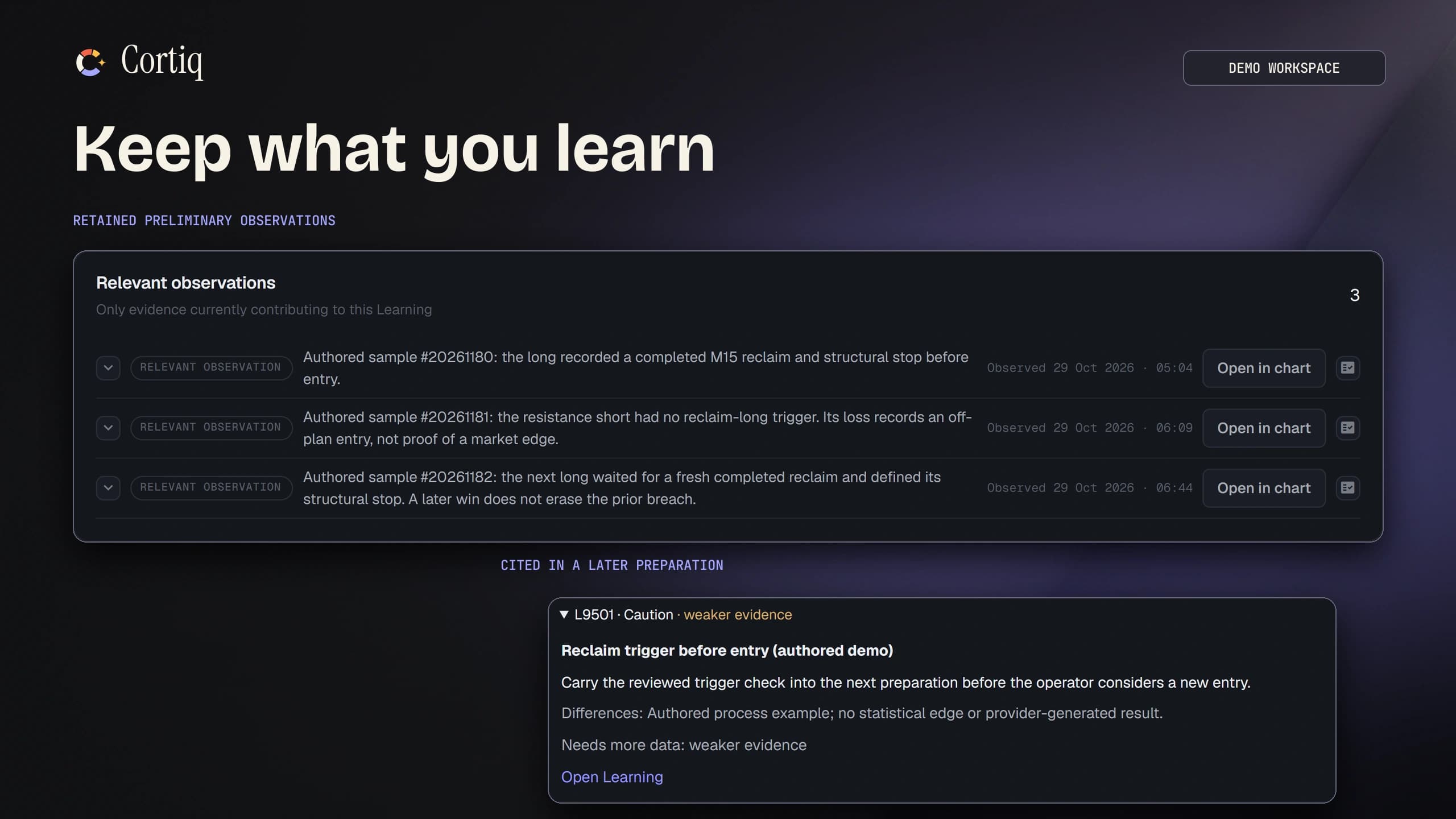
Cortiq preliminary observations and their source citation in a later preparation.
Evidence

Keep findings close to their sources

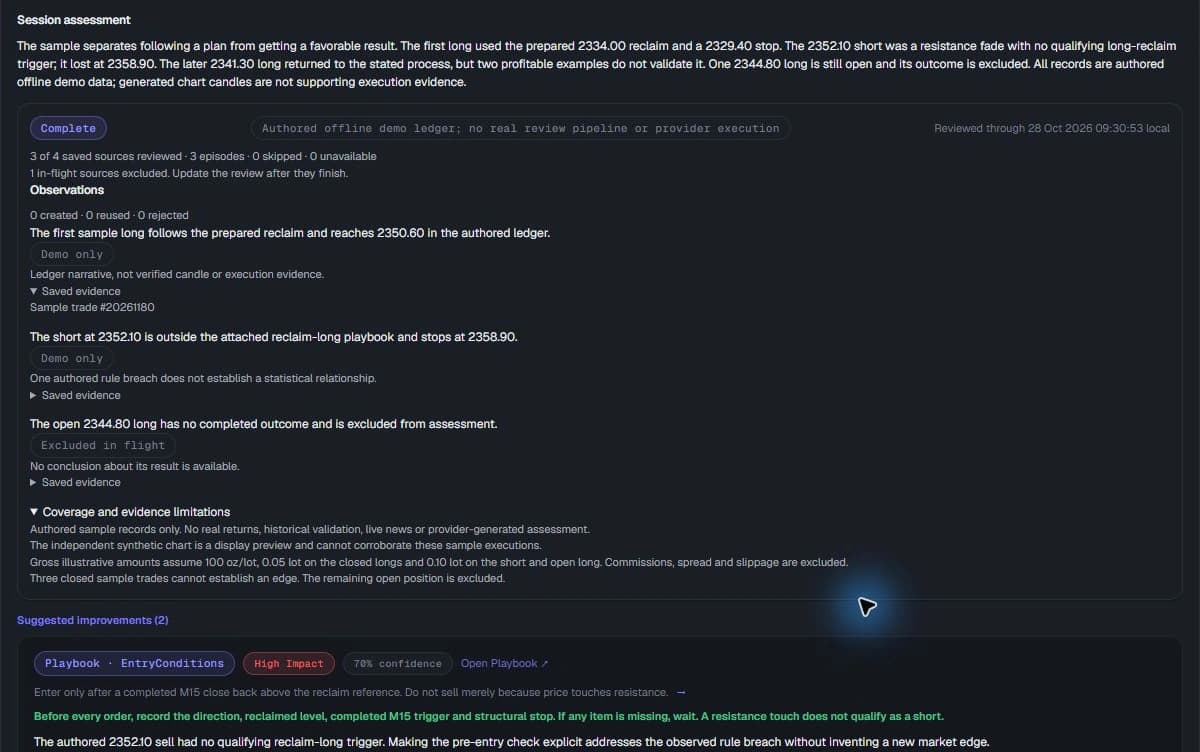
Inspect the observations and measurements behind a conclusion. The knowledge ledger keeps evidence status and limitations visible; a saved finding is not proof of a profitable strategy.

cortiq · findings and saved evidence
Cortiq demo session review with observations, an expanded saved trade source, and explicit evidence limitations
Backtesting

Replay the process before taking it live

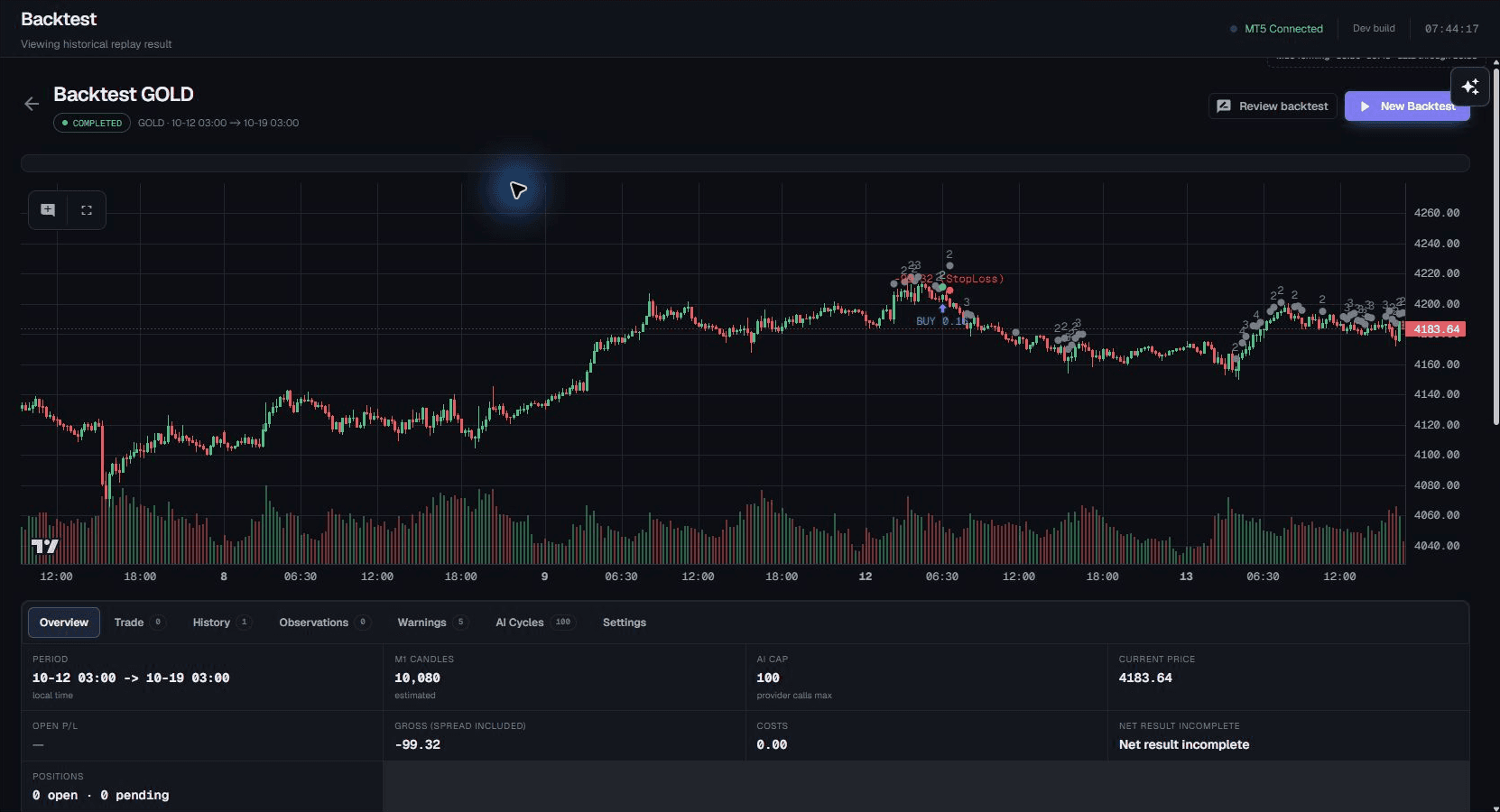
Step through a manual historical replay or run AI decision cycles on past data. Inspect the run data, context and learning settings alongside its simulated trades, costs and recorded outcomes.

cortiq · historical backtest
Current Cortiq historical backtest chart with simulated trades and recorded replay results
Virtual mode

Practice without sending live orders

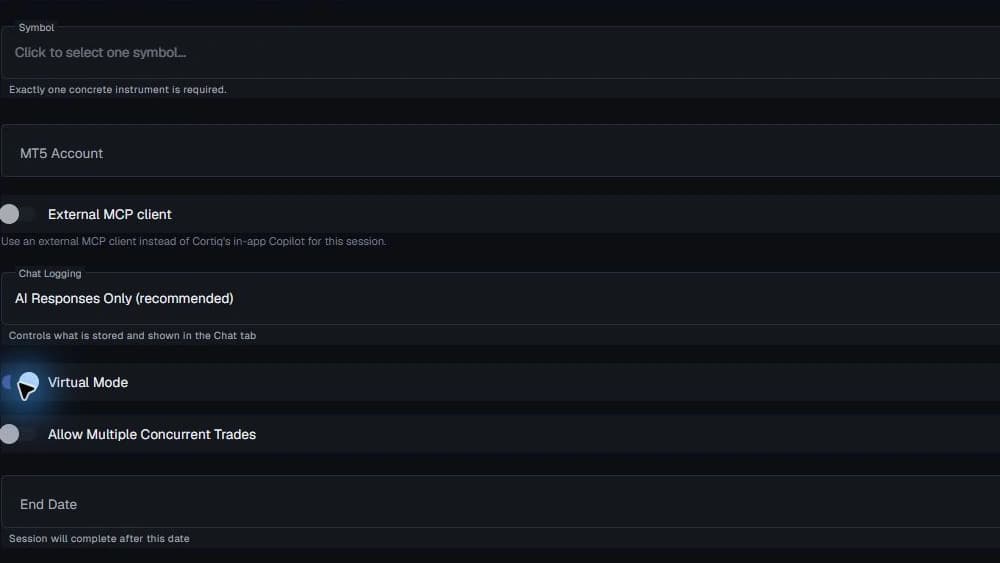
Explore a session against market prices in Virtual mode without sending orders to MT5. Inspect the workflow before deciding whether and when to grant live execution authority.

cortiq · Virtual mode setup
Cortiq Manual session setup with Virtual Mode enabled before creating a session

Bring a plan into each session.

Prepare the context, choose the inputs, and keep the chart and execution tools close to the work.

Session prep

Start with a prepared market view

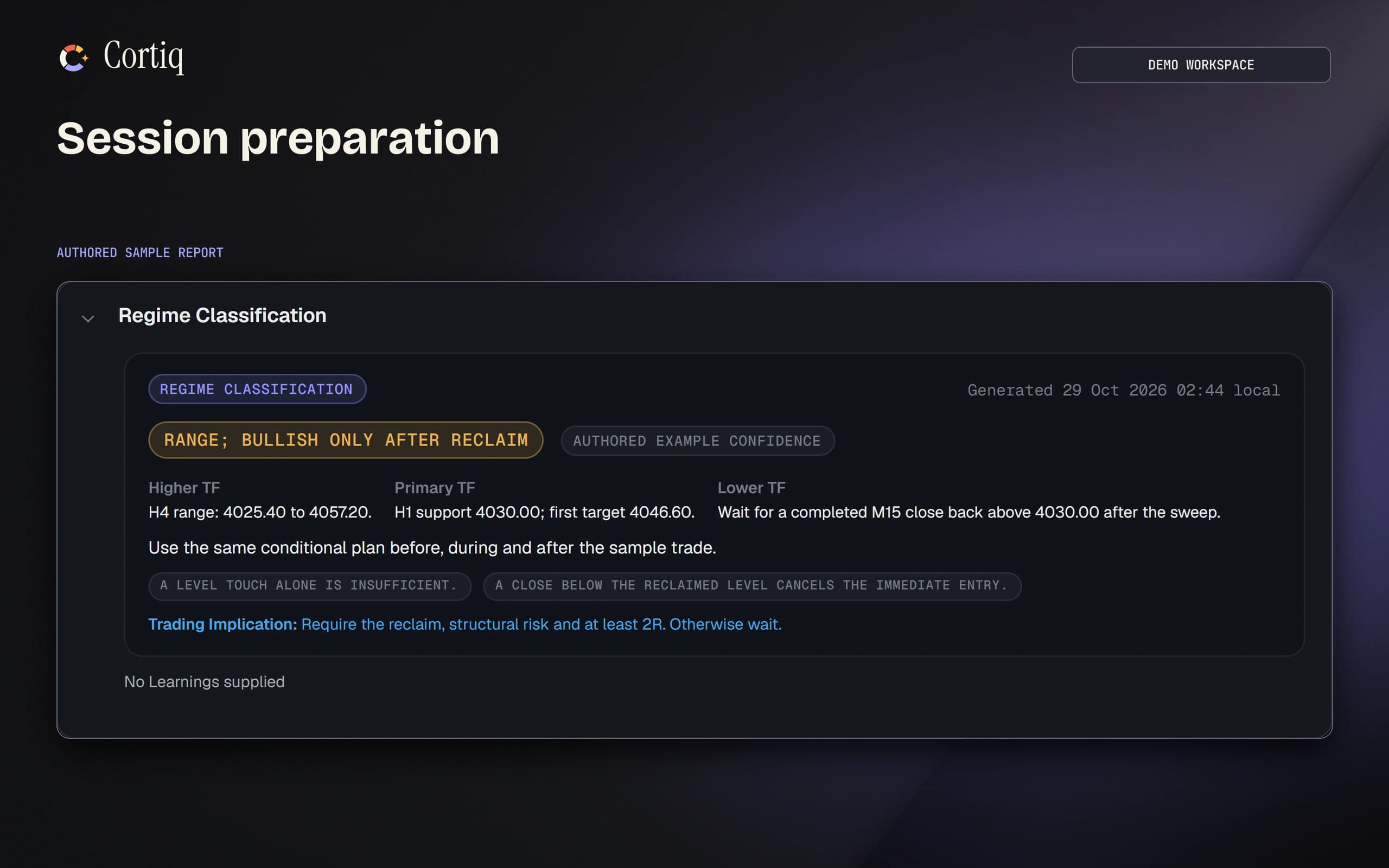
Configure preparation, sentiment and instrument-profile generation before a session. Inspect the inputs, expiry and review status before relying on the analysis.

cortiq · preparation report
Cortiq preparation report with scenarios, market context and invalidation.
Data packages

Choose the context your AI receives

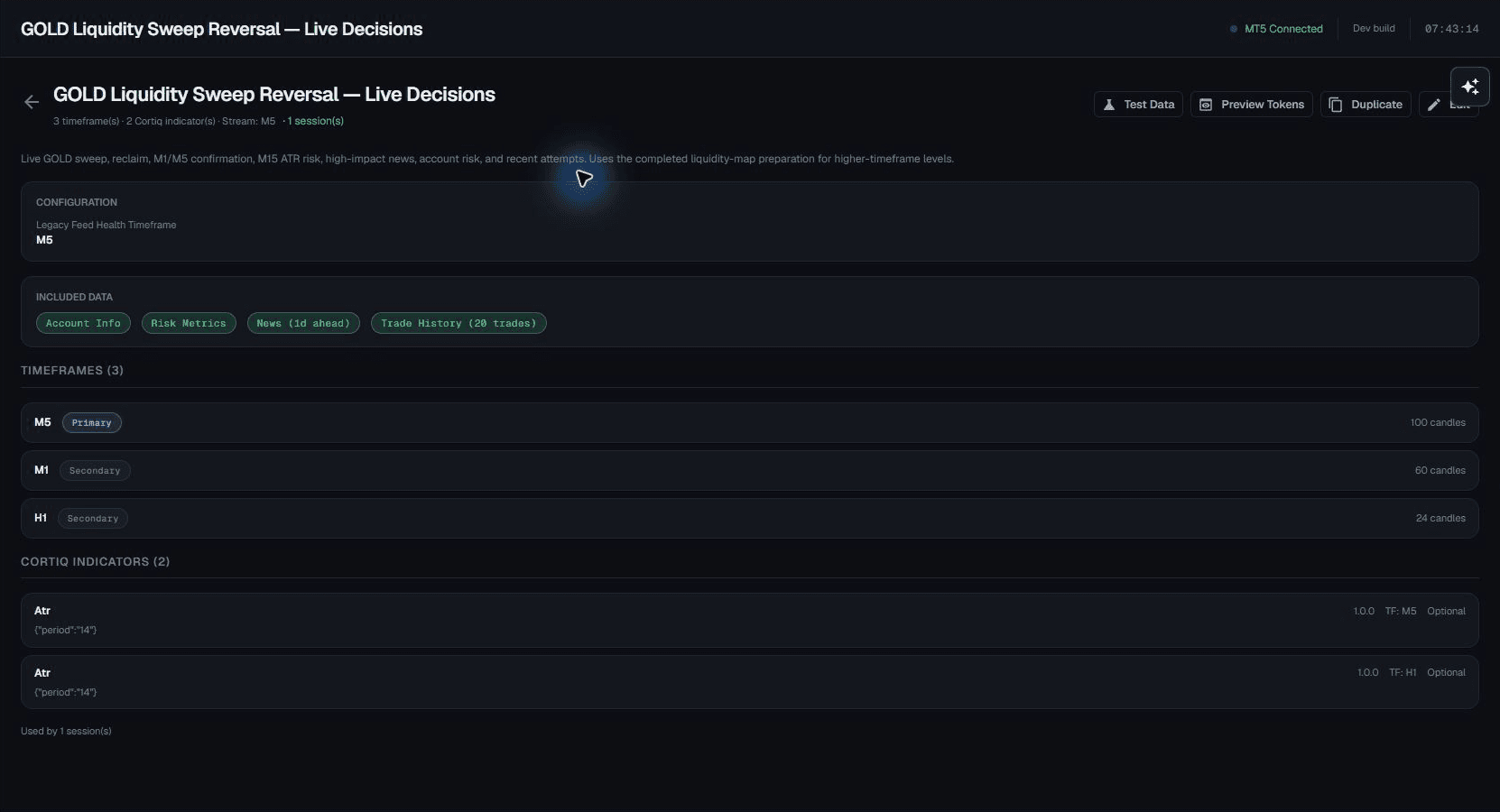
Select candle timeframes, indicators, news and account context in reusable data policies. Keep the inputs attached to the playbook and inspect what each workflow used.

cortiq · data policy
Current Cortiq data policy defining candle timeframes, indicators, and additional AI context
Built-in indicators

Give the AI structured market inputs

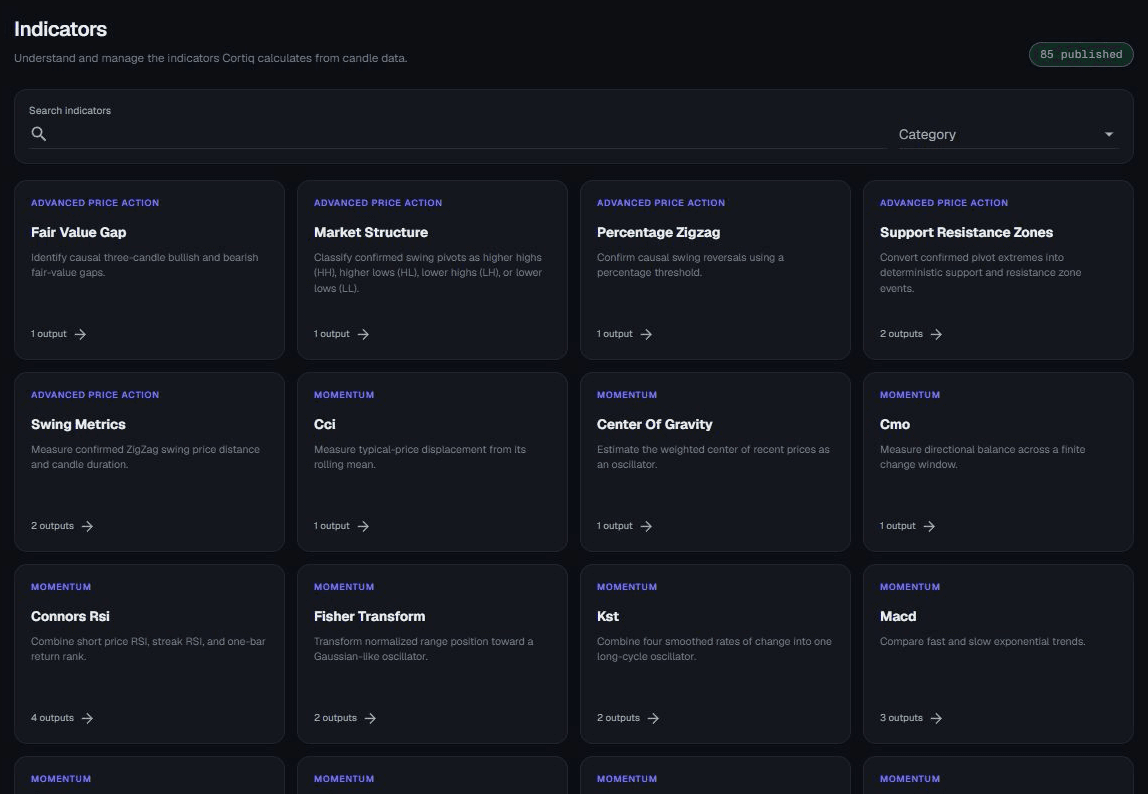
Cortiq calculates its built-in indicators from candle data. Selected candle and indicator values reach the AI as structured inputs, with the catalogue available for inspection.

cortiq · indicator catalogue
Current Cortiq built-in indicator catalogue with price action and momentum indicators
Live chart

Work from the chart in your session

Read candles, volume, indicators and recorded events in the session chart. Keep chart context close to the preparation, execution controls and decision record.

cortiq · current session chart
Current Cortiq GOLD session chart with candles, volume, and recorded event markers
Manual trading

Keep execution in your hands

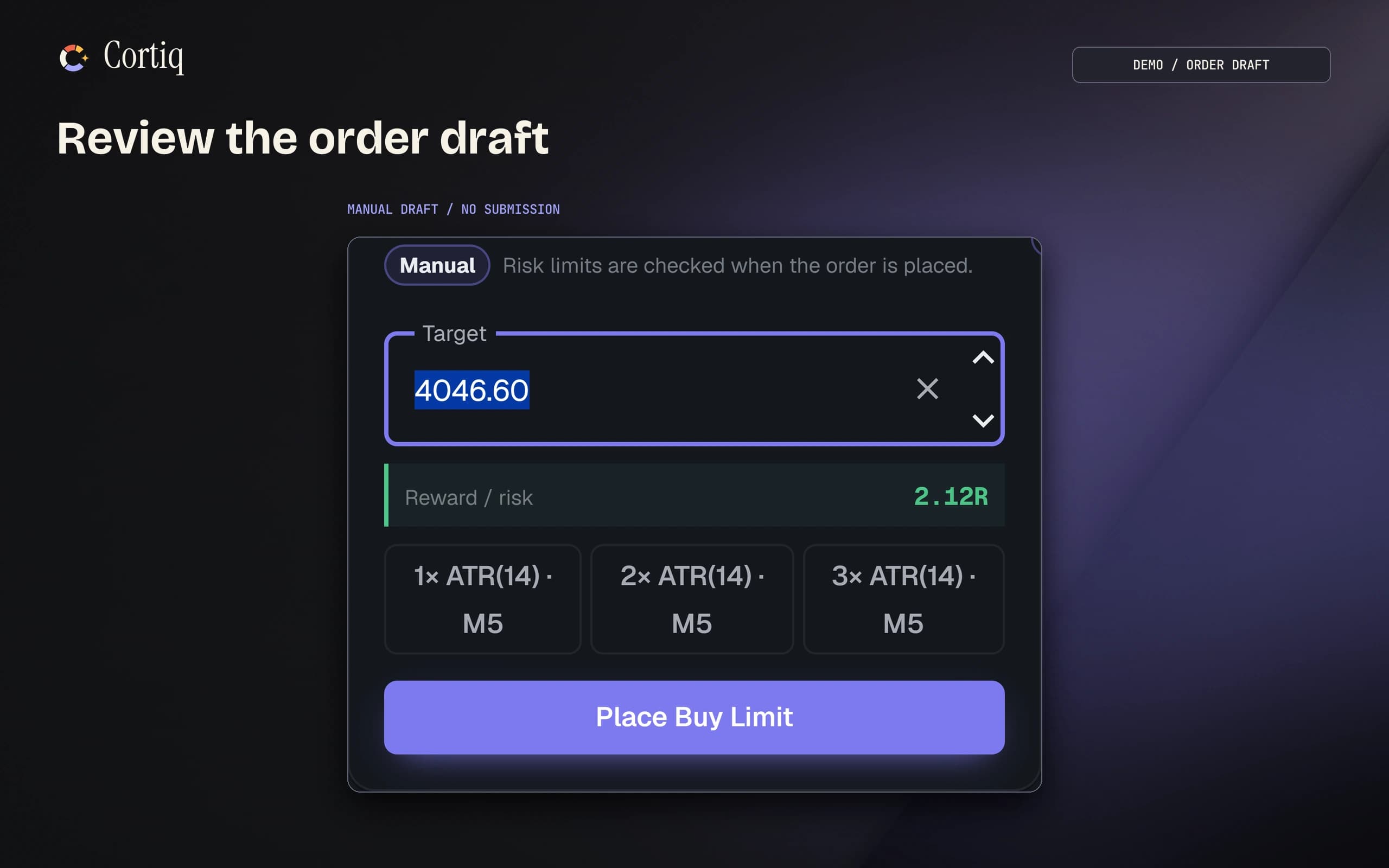
Place and manage orders in a Manual session. Set the stop and your risk percentage, inspect the calculated position size, and use Copilot for context without granting autonomous session authority.

cortiq · order draft
Cortiq order draft with target, position size and reward-to-risk controls.

Keep context and control.

Work with Copilot, define your limits, and retain the decisions you want to review.

Risk guardrails

Keep risk checks outside the model

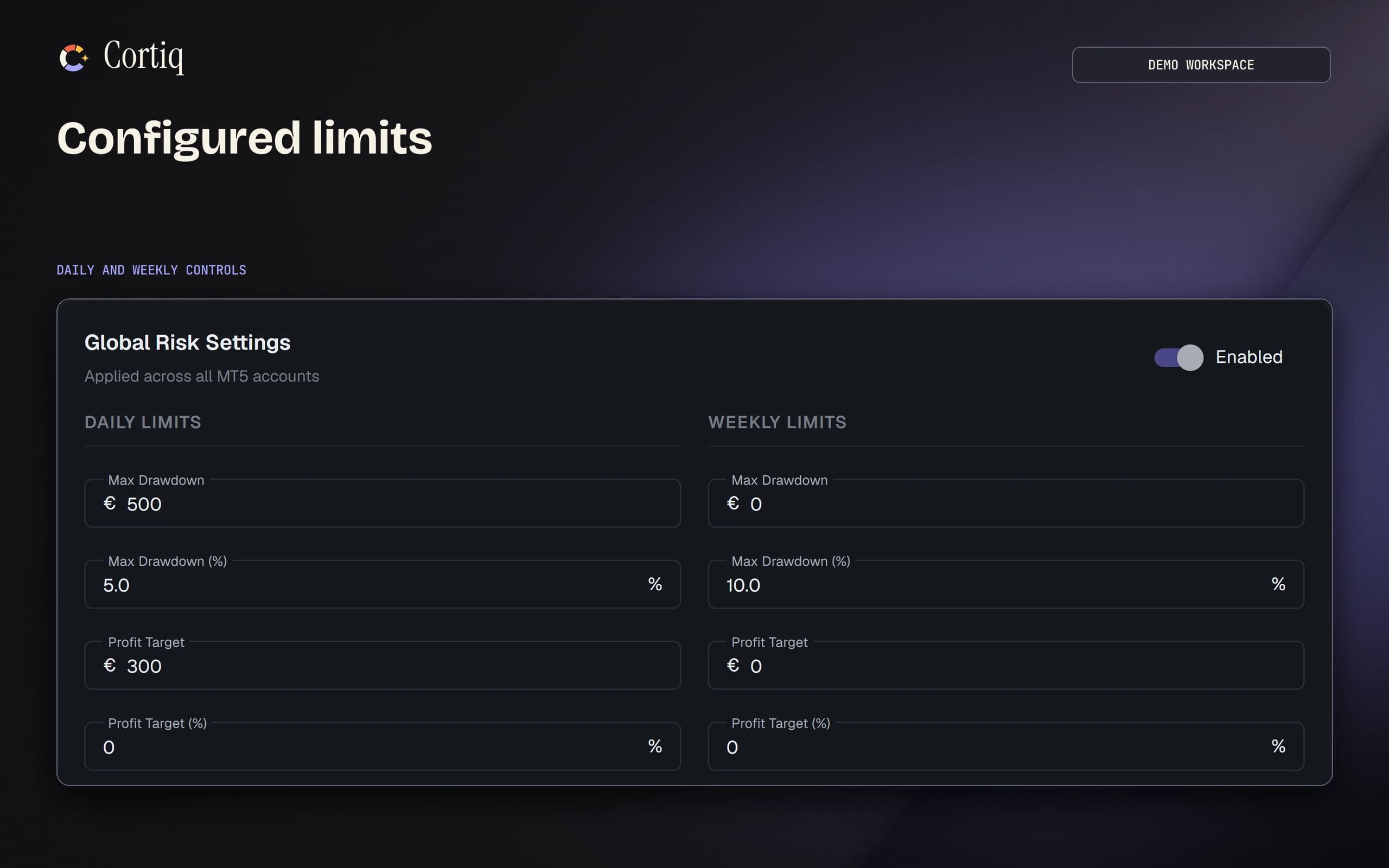
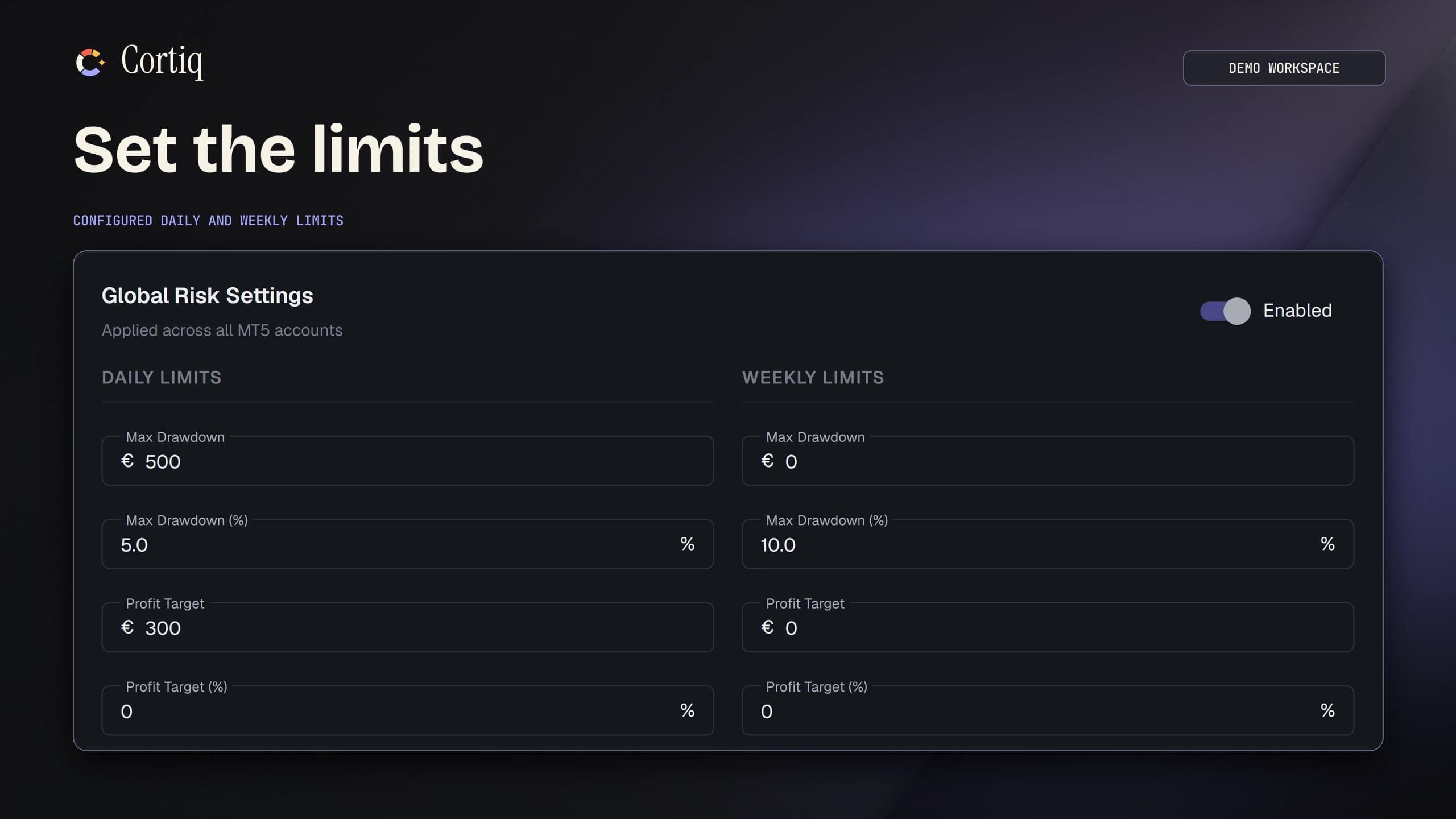
Configure global and per-account rules for drawdown, trading frequency, position exposure and loss streaks. Cortiq validates actions against those rules. Controls do not remove market risk or guarantee a maximum loss.

cortiq · risk settings
Cortiq configured daily and weekly account limits.
Daily risk

Know where the day stands

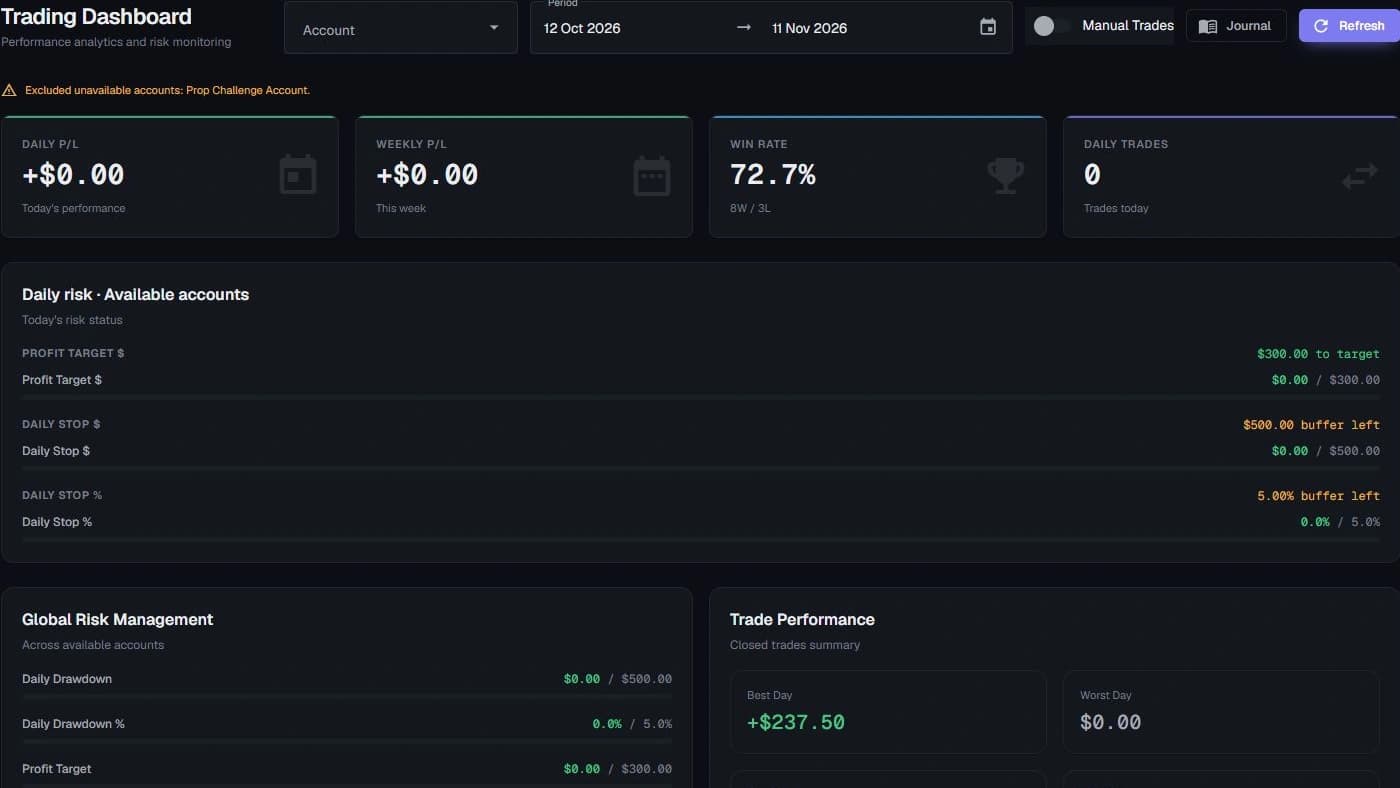
Inspect daily progress and the configured account and global limits alongside your sessions. Keep the account context and remaining authority visible while you work.

cortiq · daily risk dashboard
Cortiq demo dashboard showing daily risk progress, configured account limits, and global risk management
Journal

Keep the record behind each trade

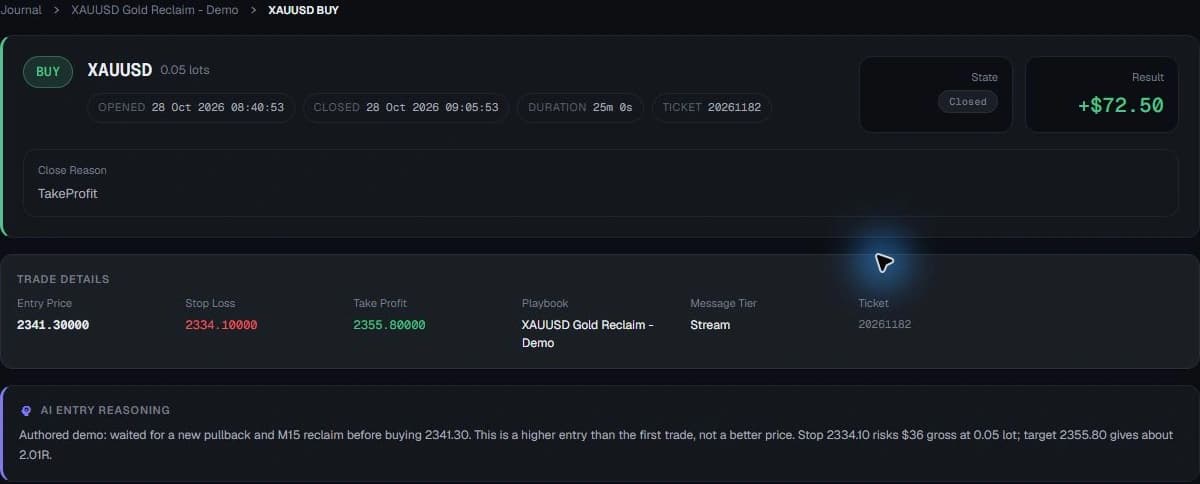
Inspect entries, stops, targets, modifications and recorded outcomes alongside the available evidence and concise decision rationale. Add your own notes and request a review.

cortiq · trade journal
Cortiq authored demo journal entry with entry price, stop loss, target, recorded outcome, and entry rationale
Cycle transparency

Follow decisions, cycle by cycle

Open the recorded AI cycles to inspect their triggers, inputs, decisions and execution outcomes. A decision to wait belongs in the record too.

cortiq · historical decision cycles
Current Cortiq AI-cycle timeline from a historical backtest, with decisions, triggers, and input status
Copilot

Work with an assistant inside your workspace

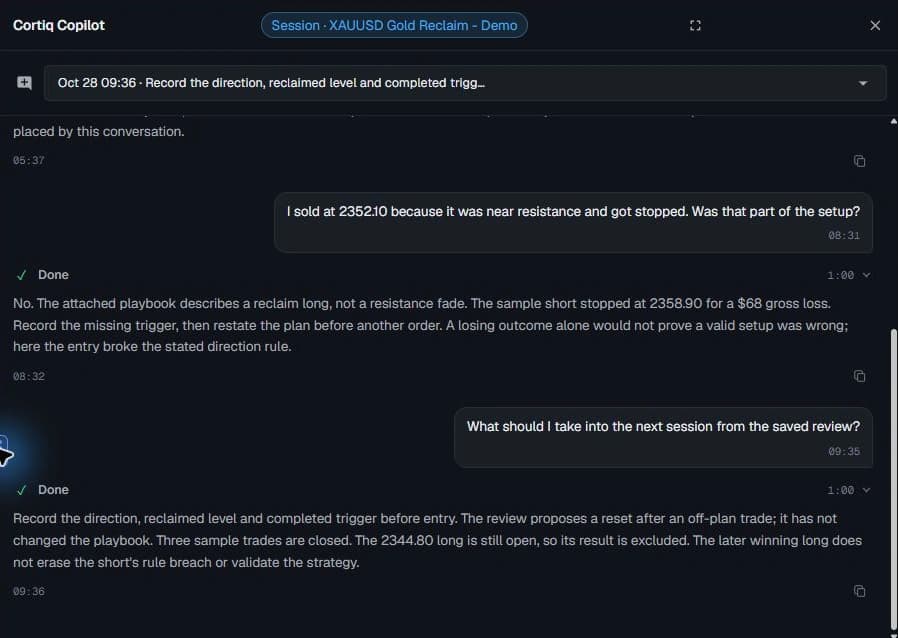
Discuss research, preparation, playbooks and recorded sessions with Copilot. Trading actions follow the configured approval and authority boundaries; an Autonomous session has its own explicitly granted scope.

cortiq · Copilot discussion
Cortiq Copilot discussing a saved demo session review and the limits of its authored trade outcomes
Bring your own AI

Choose the AI connection that fits your work.

Use a supported provider API, compatible local runtime, or supported agent connection. Configure the provider and model for each workflow. AI access and usage are separate from your Cortiq license.

OpenRouter

Connect your OpenRouter account and choose a supported model for the workflow. Access and usage charges follow your provider account.

your keysupported modelsprovider rates
Local LLM

Use a compatible local runtime and model on your hardware. Local inference avoids a provider inference bill, but still uses your compute and electricity.

local runtimeyour hardwarecompatible models
Supported agent connections

Connect a supported, locally authenticated agent through its compatible adapter. Check your provider plan, installed runtime and usage limits before relying on access.

installed agentcompatible adapterplan limits apply
Direct API

Configure a supported provider API and choose the model for the job. Your provider account controls access, rates and usage limits.

OpenAIAnthropicGemini
OpenRouterLocal LLMSupported agentDirect API
→selected provider + model→research · testing · sessions

Availability depends on the provider, model and installed runtime. Confirm compatibility, account access and usage limits in the current AI-provider documentation.

You choose your AI connection. Provider charges and plan limits apply separately; local models use your own hardware and electricity.
Execution & control

Risk limits that live outside the AI.

Cortiq wires the agent into MetaTrader 5 through a local bridge, then wraps every action in hard limits that live outside the model. The proposal is the AI's; the rules are yours.

MetaTrader 5, done properly
MT5 · execution
Local MetaTrader 5 execution bridge

Cortiq connects to your MT5 terminal through a bridge on your computer. Your selected AI connection determines where model requests are processed.

Many accounts at once

Run multiple MT5 terminals and accounts simultaneously, each on its own port. Every session binds to one chosen account.

Full order control

Market and pending orders (limit/stop), SL/TP modification, partial close, full close and cancel, with a pre-trade broker margin check before anything is sent.

Go deep on one market, not wide on ten

Each session stays with one instrument. Research, preparation and recorded outcomes remain attached to that market so you can examine the process over time.

Risk that lives outside the model
Guardrails · trust
Hard limits, checked every cycle

Global and per-account rules enforce daily and weekly drawdown, profit targets, max trades, per-symbol caps and loss-streak stops. Cortiq checks them outside the model on every cycle.

Emergency stop

A global breach pauses sessions across accounts; an account breach affects that account. Pending-order cancellation follows your risk-management settings. Sessions can resume when limits clear.

Your sizing wins

Cortiq calculates position size from configured account risk and the trade stop, then checks it before execution. Broker conditions, gaps and slippage can still change realised losses.

Approval gates or explicit Autonomous authority

The Copilot dock gates changes until you approve them. An Autonomous session runs unattended only when you explicitly configure that authority, with time windows and host checks enforced outside the model.

Set the limits. Inspect how they apply.

Cortiq configured daily and weekly account limits.
Risk configuration in the current Cortiq app. These are example settings, not recommended trading limits.

Set the limits

Follow session activity and configured limits. Risk controls can pause trading when applicable limits are reached.

Journal and review

See why every trade was taken.

Keep recorded trade actions and outcomes alongside the available evidence and concise rationale. Request a review when you want to examine the session, discuss what happened, and decide which changes belong in your process.

Keep the trade history close to the evidence

Inspect the recorded entries, stops, targets and modifications alongside the available decision evidence. Add notes where your own interpretation matters.

The lesson doesn't get lost this time

The evidence and concise rationale for every decision are saved as plain text you can re-read, tag and annotate. A P/L number alone tells you nothing about why.

Choose what to carry into the next session

Request a review, inspect its supported observations, and discuss proposed changes before applying them to a playbook or preparation.

Don’t take this page’s word for it.

Read published Cortiq preparations on Open Market Journal to see the context and limitations in an actual market brief before you buy.

Read a published Cortiq preparation
openmarketjournal.com · a public journal powered by Cortiq
Current Cortiq AI-cycle timeline from a historical backtest, with decisions, triggers, and input status
Actual Cortiq decision record from a historical backtest. Simulated execution, not a live track record.

Who built this

I built Cortiq for my own AI agent first.

Simeon Vanov, founder of Cortiq

Simeon Vanov · Founder

Software developer at a large tech company. Ten years building trading algorithms.

I’ve been building trading algorithms for about ten years. When I started putting an AI agent to work on the market, every session started from scratch. Context sat in disconnected chats. I couldn’t see what the agent had looked at or why it acted, and when something broke behind the scenes I had no way to trace it.

So for the past year I’ve worked on one thing: a harness that gives the agent the market and my research, and records what it saw and why it acted. My own agent trades through it, and I use it for my own session prep.

It’s the tool I wanted and couldn’t find. Now I’m sharing it.

Before you decide

Start small. Delegate nothing until you’re ready.

Start with a question you already have about your market. Work through it with Copilot and keep execution in your own hands. You can consider automated execution separately, when you choose to grant that permission.

Your first useful session

Start with a practice session. You can examine how Cortiq works before deciding whether to use live execution.

  1. Install and activate

    Download Cortiq and enter the key emailed after payment.

  2. Connect your tools

    Follow the setup checklist for MT5 and a supported AI connection.

  3. Choose one market

    Bring a question you would otherwise ask in a chat, such as what happened around a level you are studying.

  4. Try a Virtual session

    Inspect the context and recorded decisions, then request a review. No orders are sent to MT5.

What changes if I already have ChatGPT and MT5?

You can take a question from research to a historical test, then bring the selected preparation into a trading session. Cortiq connects your AI to those tools and keeps the records with the instrument, rather than leaving you to move screenshots and explanations between chats.

Can I start while I am still developing my approach?

Yes. Start with one question about a market or a setup you want to investigate. Use research and historical tests to make the idea more specific. You still define the rules and permissions before delegating execution. Cortiq does not supply a profitable strategy.

Can I use it without letting AI place trades?

Yes. In a Manual session, you place and manage orders with Copilot assistance. A separate Autonomous session can monitor and execute only within the authority you grant. Risk checks run outside the model. Losses remain possible.

How do I know whether to trust an AI answer?

Treat an AI answer as a claim to check. Inspect the data it used, its recorded actions and the test settings. Look at failed cases as well as successful ones. Cortiq makes that work available to inspect; it does not make AI infallible or turn a backtest into proof of future results.

What else will I need to pay for?

The €199 license is a one-time payment for Cortiq and future desktop updates. Your chosen AI connection has its own access requirements, charges and usage limits. Broker fees remain yours. Compatible local models use your hardware and electricity.

What if I buy it and cannot get it working for me?

Check the installation requirements before paying. After purchase, follow the setup and first-session guides, or email support with a compatibility question. Try the workflow in Virtual mode without sending orders to MT5. If it does not fit, request a full refund within 14 days of your initial purchase, for any reason.

The complete Cortiq workspace

Cortiq plans and pricing

Give AI the context and tools to work across research, historical testing and trading. Keep your instrument knowledge and choose the authority for each session.

Cortiq lifetime license

€199 once

One payment for lifetime access.

  • Research, preparation, and playbook workspaces
  • Copilot assistance across your workflow
  • Manual and Autonomous sessions
  • Historical backtesting and Virtual mode
  • Session and backtest reviews
  • Activation on up to two machines
  • All future Cortiq desktop updates included
  • 14-day refund, for any reason

After payment, your key is emailed to you. Install and activate Cortiq, then follow the first-session checklist to connect MT5 and your AI and start in Virtual mode.

Secure Stripe checkout · Key emailed after payment

Broker fees and AI-provider usage remain yours. The license covers the desktop app and its future updates. 14-day refund policy.

Cortiq monthly subscription

€20 per month

Full workspace access. Renews monthly until you cancel.

  • Research, preparation, and playbook workspaces
  • Copilot assistance across your workflow
  • Manual and Autonomous sessions
  • Historical backtesting and Virtual mode
  • Session and backtest reviews
  • Activation on up to two machines
  • Cortiq desktop updates while subscribed
  • 14-day refund on your first payment

After payment, your key is emailed to you. Install and activate Cortiq, then follow the first-session checklist to connect MT5 and your AI and start in Virtual mode.

Secure Stripe checkout · Key emailed after payment

Eligible beta participants receive a personal checkout link for €6/month (70% off) for their first six paid months, then €20/month.

Upgrade before your first renewal and we’ll credit your first payment toward the €199 lifetime license. We stop renewal when we prepare your upgrade link, and you keep your paid access until the end of the month you paid for.

Broker fees and AI-provider usage remain yours. Monthly license terms · 14-day refund policy

What you bring

  • A 64-bit Windows 10 or 11 computer
  • Your MetaTrader 5 terminal and broker account
  • A supported AI connection for AI features
Check the setup requirements

Connect a supported AI provider or compatible local model. AI usage is separate from the Cortiq license. Provider account requirements, charges, and usage limits apply; local models use your hardware and electricity.

FAQ

Straight answers before you buy

Setup requirements, AI connections, execution choices, and your license.

Start with a setup you want to investigate. Research historical examples with Copilot, define rules and backtest them, then bring selected preparation into a trading session. Save useful findings with the instrument for later work. You can place and manage orders yourself in Manual sessions or grant permission to a separate Autonomous session.

Bring your research into your next trading session.

Start with the setup you want to understand. Study it with AI, test its rules and keep useful findings with the instrument. Trade with Copilot at your side, and choose separately whether to delegate execution.

€199 once · 2-machine activation · All future Cortiq desktop updates included · 14-day refund
Broker fees and AI-provider usage remain yours.

Cortiq is a research and execution tool, not financial advice. Trading involves risk and you can lose money.