Founding cohort · 10 traders

Build a repeatable process around one market.

Cortiq keeps your preparation, MT5 execution, risk limits, journal, and AI in one Windows workspace—so every session starts with the context you built before.

For the first 10 traders, personal installation, MT5 and AI setup, and your first Virtual session with Simeon are included.

Watch the 110-second walkthrough
€199 once · founder onboarding · 2 machines · 14-day refund
All future Cortiq desktop updates included. Broker fees and AI-provider usage remain yours.
Cortiq’s real daily prep publishes on Open Market Journal Built and used daily by the founder · Windows · MetaTrader 5 · manual or Autonomous execution
PreparationMarket plan ready
RiskRisk checked
JournalReview captured
cortiq · EURUSD · live sessionMT5 CONNECTED
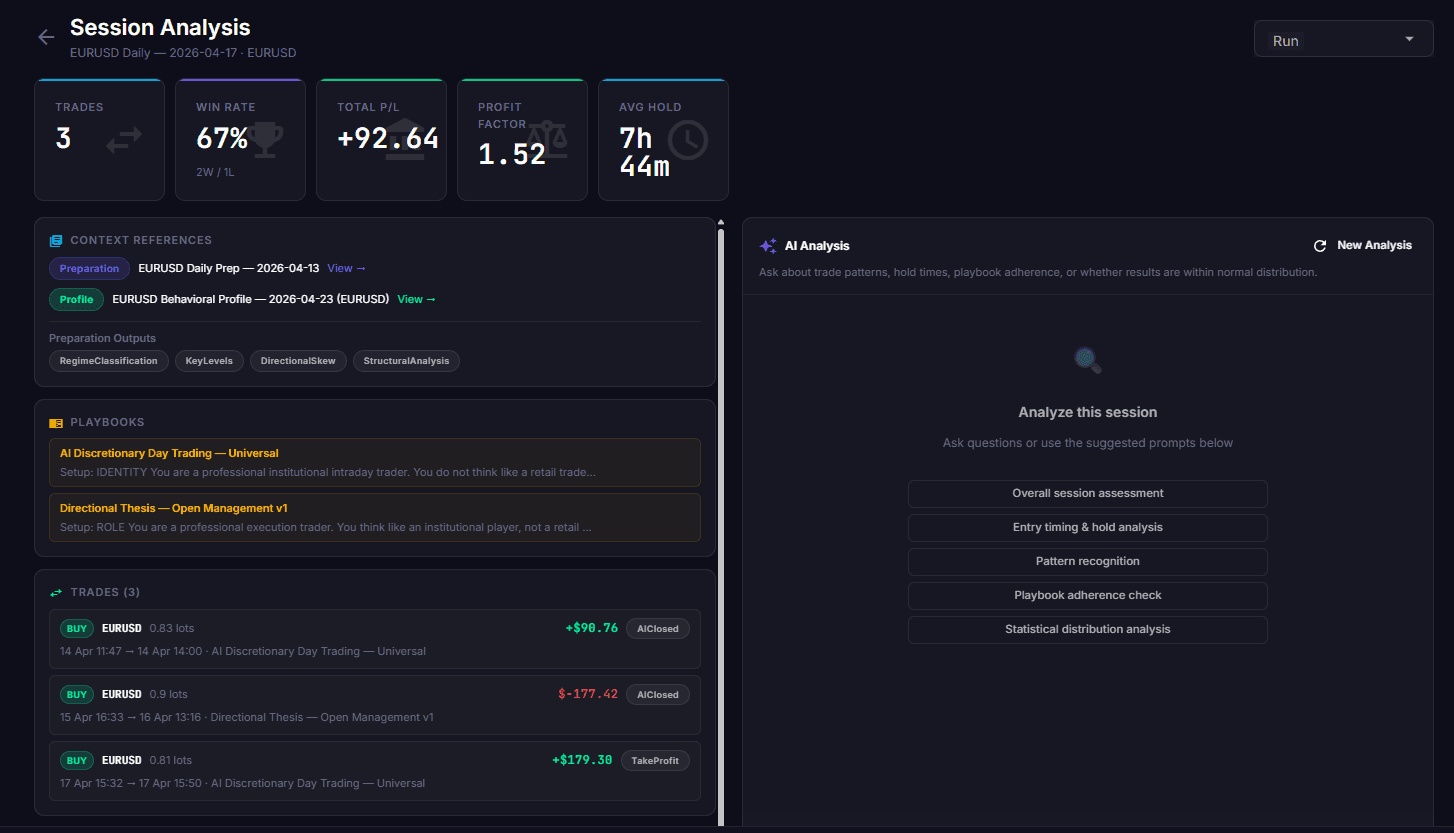
Cortiq workspace showing a prepared EURUSD trading session
Before Cortiq

You already know this feeling.

01

Prep eats two or three hours before you’ve even opened a chart.

02

You know you’ve seen this setup before — last month, maybe. It’s somewhere in a folder of screenshots you’ll never open again.

03

The journal started strong on Monday. By Wednesday the spreadsheet is empty again.

04

You’ve tried asking ChatGPT. It doesn’t know your market, your levels, or your rules, so you close the tab and go back to guessing.

05

What you want isn’t another indicator. It’s a process you can actually keep.

None of this is a discipline problem. It’s a tooling problem.

Cortiq exists because this was the founder’s trading day too — before he built his way out of it.

See how a session actually gets prepared
One continuous trading practice

Prepare, trade, and review without resetting the context.

Cortiq does not give you a strategy. It gives the strategy you already trade a place to accumulate evidence, operate inside boundaries, and remember what happened.

Prepare

Start with the market already in context

Keep higher-timeframe structure, research, playbooks, and preparation attached to the instrument instead of rebuilding the picture in scattered tabs.

Execute

Trade inside authority you set

Place trades yourself or grant a separate Autonomous session explicit authority. Risk and action limits stay outside the model either way.

Review

Carry the lesson into the next session

Cortiq reconstructs the trade, evidence, actions, and outcome so the record of one market grows instead of disappearing into another abandoned journal.

Founder onboarding included

What happens after you buy

You are not buying a key and being left with a setup guide. We get you from checkout to a completed virtual session together.

01

Your license arrives

Stripe completes the €199 one-time payment and your two-machine activation key is emailed to you.

02

We install it together

You get a personal founder onboarding session. We install Cortiq and verify the local MT5 bridge together.

03

We connect your stack

Bring the MT5 account and AI provider you already use. We configure the connection and your first risk boundaries.

04

Run your first virtual session

Before any live order, we complete the real workflow in Virtual mode so you leave knowing what to do next.

Personal onboarding is included for the first 10 traders because the fastest way to improve Cortiq is to watch serious traders use it—not because setup should stay hard.

Cortiq is for you if…

  • You trade through MetaTrader 5 on Windows.
  • You already have a market or setup you want to study more deeply.
  • You want AI to support a process you can inspect and control.
  • You will begin in Virtual mode and give honest product feedback.

Cortiq is not for you if…

  • You want signals, copy trading, or a promise of easy profit.
  • You want to scan dozens of symbols at once.
  • You expect AI to replace your strategy or responsibility.
  • You need macOS, mobile, TradingView, or a platform other than MT5 today.
Founding Trader license — €199 once. Includes founder onboarding, activation on 2 machines, all future Cortiq desktop updates, and a 14-day refund for any reason. Broker fees and AI-provider usage remain yours.
No signals. No promised returns. Trading remains risky and you remain responsible for the authority you grant.
110-second overview

See the workspace, start to finish

A narrated tour of the one-market loop — research the edge, write the playbook, backtest it on real history, then go live — with every AI call and every guardrail on screen.

cortiq · session walkthrough01:50
Chapters
Narrated overview · 1:50
Produced from the desktop app on a single instrument. Jump to any chapter.
produced · Jul 2026· Windows desktop
Trader-led methodology

Prepare → Decide → Execute → Review

Most tools hand you a signal and walk away. Cortiq runs the entire cycle — and every session, backtest and research run compounds in one per-instrument knowledge base.

01
Research

Prepare a single-instrument workspace with D1→M15 MT5 context, structured research, train-only hypotheses, out-of-sample validation and a written report you can inspect.

02
Playbook

Turn findings into explicit rules: setup, entry, risk, management and invalidation. Attach preparation packages, sentiment reports and an instrument profile so every session starts from real context.

03
Backtest

Replay the playbook over historical M1 with real AI decision cycles — strictly no-lookahead, with as-of prep and sentiment. Measure expectancy before a cent of capital is at risk.

04
Live

Use the prepared context to trade manually or run a separate Autonomous session. External risk guardrails apply in either mode, and the result feeds the next session.

Compound in the Instrument Hub

Every session and backtest distills what it saw into the instrument's knowledge ledger — where observations become trusted learnings only once enough evidence confirms them. Live reads rank below backtested ones, and the ★ mastery rating rises only when a strategy reaches production. The market compounds instead of resetting.

instrument hub
Research
Playbook
Backtest
Live
Straight answers

The questions a skeptic asks first

You should be wary of opaque trading software. Here is exactly where Cortiq assists your process and where your decisions and rules remain in control.

Q1
Isn’t this just another black box?

No. Choose a fully hands-on Manual session or explicitly configure a separate Autonomous session. Cortiq logs the evidence, decision, requested action and broker outcome so you can inspect what happened.

Q2
I don’t trust AI with my money.

Good. You can keep execution Manual or configure an Autonomous session with explicit authority and risk limits. Cortiq’s validators run outside the model, and Virtual mode lets you test the workflow without live orders. These controls do not remove market risk.

Q3
How does Cortiq keep me in control?

You choose Manual or Autonomous execution, define the authority and can stop execution. Cortiq enforces risk and action limits outside the model.

Q4
The setup looks hard.

It is a guided Windows install and an activation key you paste on first launch. Connect your MT5 account, point it at an AI you already have — OpenRouter, a local model, or your existing ChatGPT or Claude — and run.

Q5
Why focus on one market per session?

Depth over breadth. A session stays on one instrument so preparation, decision criteria and journal review share the same context. Multi-symbol scanning is deliberately outside the workflow.

Q6
What if the AI is wrong?

It will be, sometimes. Cortiq is a tool, not a promise. Guardrails enforce exposure and action limits, but they cannot make a trade safe or prevent losses. Cortiq does not predict markets or offer signals.

From the founder

Built for me. Now for you.

SV
Simeon Vanov
Founder of Cortiq

I’ve spent close to a decade as a software engineer, architecting systems at one of the world’s largest tech companies. Trading has been my other decade, a hobby I never stopped taking seriously.

My own prep used to eat two or three hours before I’d even opened a chart. I kept losing the lesson from a trade I’d made a month before, buried in a folder of screenshots I never reopened.

Along the way, I built my own trading tools, just for me. Cortiq is one of them, the one that turned out beautiful, refined over years until it worked exactly the way I needed.

Now I want other serious traders to have it too. I think you’ll get real use out of it.

“I still trade with it every day, same as you will.”
Founding Trader offer

Own Cortiq for €199 once.

I am starting by personally installing Cortiq and running the first Virtual session with 10 Founding Traders.

Lifetime license
Cortiq — Founding Lifetime License
199one-time paymentnot a subscription

Your activation key is emailed after checkout. I will contact you to arrange the personal onboarding session.

What's included
  • Desktop app for Windows 10 / 11
  • Activation on up to two machines
  • All future Cortiq desktop updates included
  • One-to-one installation and setup with the founder
  • Help connecting MT5 and your chosen AI provider
  • Your first Virtual session completed together
  • Research, playbooks, backtesting, execution, and journal in one workspace
  • 14-day refund, for any reason
Bring your own AI

Cortiq never resells inference. Point it at OpenRouter, a local model on your own GPU, your existing ChatGPT or Claude subscription, or a direct provider API. The only ongoing cost is your own AI usage — and with a local model, that is €0.

Secure Stripe checkout Key emailed after payment Personal founder onboarding

No Cortiq subscription. Broker fees and AI-provider usage remain yours. The license covers the Cortiq desktop app and its future updates, not unrelated products or services created later. Cortiq is an execution and research environment, not a signals service and not financial advice. Trading is risky and you can lose money. Read the refund policy and risk disclosure before you buy.

FAQ

Straight answers before you buy

What Cortiq is, what it needs, and what it deliberately does not do. No overpromises.

Cortiq is a Windows 10 / 11 desktop app, 64-bit. It connects to MetaTrader 5 only — no other platform, web or mobile build today.

Yes. Cortiq drives your own MetaTrader 5 over a local bridge, so you bring your own MT5 broker account and terminal. It executes through your account; it is not a broker and holds no funds.

You bring your own AI — there is no Cortiq-hosted AI and you are never locked to us for inference. Point Cortiq at OpenRouter (one key, hundreds of models), a local model on your own GPU (Ollama / LM Studio / llama.cpp), your existing ChatGPT or Claude subscription via the official CLI, or a direct provider API (OpenAI, Anthropic, Gemini). With a local model, your ongoing AI cost is €0.

Choose a Manual session, where you place and manage each order, or a separate Autonomous session, where an agent can monitor and execute through MT5 inside the session authority and risk limits you approve. Cortiq records its actions, but trading remains risky and you remain responsible for the account.

Yes. A Manual session is fully hands-on: you place and manage each order. The order ticket asks for your stop first, then a risk percentage, and calculates the position size from your live account balance.

The prep, the memory, and the record. The session opens with the market already analysed and the instrument’s accumulated learnings attached, your orders are sized against explicit risk limits that are enforced outside the model, and every trade lands in the journal and session review alongside its evidence and concise rationale. The chart itself is a normal chart — candles, timeframes, drawing tools, indicators.

A session stays with one instrument so its context, preparation and review remain coherent. Cortiq keeps research, playbooks, sessions and backtests together in the Instrument Hub, where you can inspect and challenge the evidence behind your process.

Yes. Cortiq supports multiple MT5 terminals and accounts simultaneously, each on its own port. A session binds to a chosen account, and the risk validators run both globally and per account.

No. Cortiq is an execution and research environment, not a signals service and not financial advice. It gives the agent a controllable place to build and run an edge; the edge and the rules are yours. Trading is risky and you can lose money.

Not in the always-on, fire-every-tick sense. The agent wakes on a candle close, a price level, or a scheduled time, then goes back to sleep. See how Cortiq handles AI day trading for the full frequency model and its guardrails.

Because Simeon personally installs Cortiq and runs the first Virtual session with each trader in the initial cohort. Starting with 10 keeps that onboarding genuinely personal while the product is still early.

We install and activate Cortiq, connect one MT5 account and your chosen AI provider, configure the starting boundaries, and complete your first Virtual session together.

Cortiq is an early product opening to its first paying traders. You are buying a working desktop application, with direct founder onboarding and a 14-day refund if it is not right for you.

Buy through Stripe checkout and your activation key is emailed to you. One key activates up to two machines. Simeon will contact you to arrange the personal installation and onboarding session.

Yes. Your first onboarding session runs in Virtual mode with no real orders, so you can inspect the workflow end to end. You decide whether and when to use Cortiq with live execution.

Yes — there is a 14-day refund. Refunds are processed back through Stripe. See the refund policy for the full terms.

Yes. All future Cortiq desktop updates are included with your lifetime license at no additional license charge. Cortiq downloads updates in the background and installs them on restart only when no session is active and no trade is open. Broker fees, AI-provider usage, and unrelated products or services sold separately are not included.

Founding cohort · 10 traders

Start your first Cortiq session with me.

Get Cortiq, every future desktop update, and personal setup for €199 once. We’ll install it, connect MT5 and your AI, and complete your first Virtual session together.

All future Cortiq desktop updates included · 14-day refund, any reason · 2-machine activation · no Cortiq subscription
Broker fees and AI-provider usage remain yours.